Sorting Group By Lists by count
September 28, 2021, 4:54 pm - James Farrer
I've often needed to sort by whatever had the most/least of a grouping and generally used the list context menu to go to a Bar Chart but then I often can't see the data without another click and other hassles. As it turns out there's a URL parameter that can be added to set the aggregate sort.
&sysparm_group_sort=COUNT
OR
&sysparm_group_sort=COUNTDESC
Deleting Journal Field entries
May 25, 2021, 9:32 am - James Farrer
This comes up from time to time and it's always a scramble to find the info. This article from SN covers how to delete the entries: https://support.servicenow.com/kb?id=kb_article_view&sysparm_article=KB0520375
Merging duplicate records in ServiceNow
August 9, 2019, 4:42 pm - James Farrer
To merge duplicate records, you have to make sure you know which record to keep and combine data in that record. The first usually takes a manual comparison and update of the fields. The other major piece is resolving references to the record that will be deleted. That's where this script comes in.
If you’ve got a unique identifier of some kind you can use a script like this to find the duplicates. Otherwise, it’s likely going to be a manual process of identifying them.
var count = new GlideAggregate('cmdb_ci');
count.addAggregate('count', 'name');
count.orderByAggregate('count', 'name');
count.addHaving("count", ">", 1);
count.query();
while (count.next()) {
   var name = count.name;
   var record_count = count.getAggregate('count', 'name');
   gs.info("Duplicates: " + name + ", Count: " + record_count);
}
Once you know which record to keep and which to delete, the following code will be helpful. It goes through the relevant tables where we can find any references to it and updates the records to point to the record that will be kept. It’s got a built-in flag so you can do a test run. The script takes the table the records are on, the Sys ID of the old record, the Sys ID of the record to move references over to, and a flag to indicate whether to save the changes (true = save changes, false or omitted = test run).
function mergeRecords(table, move_from_id, move_to_id, save_changes){
  if(move_from_id == move_to_id){
    gs.info("The ID's are the same: " + move_from_id);
    return;
  }

  var refTable = new TableUtils(table).getTables();
  gs.include('j2js');
  refTable = j2js(refTable).join();

  //Query dictionary table for reference, document_id, and condition fields
  var dict = new GlideRecord('sys_dictionary');
  dict.addEncodedQuery('referenceIN' + refTable).addOrCondition('internal_type', 'document_id').addOrCondition('internal_type', 'conditions');
  //Do not query audit and log fields
  dict.addQuery('name', 'DOES NOT CONTAIN', 'var__m_');
  dict.addQuery('name', 'DOES NOT CONTAIN', 'ecc_');
  dict.addQuery('name', 'DOES NOT CONTAIN', 'ha_');
  dict.addQuery('name', 'DOES NOT CONTAIN', 'syslog');
  dict.addQuery('name', 'DOES NOT CONTAIN', 'sys_history');
  dict.addQuery('name', 'DOES NOT CONTAIN', '_log');
  dict.addQuery('name', 'DOES NOT CONTAIN', 'text_search');
  dict.addQuery('name', 'DOES NOT CONTAIN', 'ts_');
  dict.addQuery('name', 'DOES NOT CONTAIN', 'sys_watermark');
  dict.addQuery('name', 'DOES NOT CONTAIN', 'sys_audit');
  dict.orderBy('name');
  dict.orderBy('element');
  dict.query();
  while(dict.next()){
    var table_name = dict.name;
    var field_name = dict.element;
    // Skip tables used for Table Rotation
    var table_rotation_gr = new GlideRecord("sys_table_rotation_schedule");
    table_rotation_gr.addQuery("name.name", '!=', table_name);
    table_rotation_gr.addQuery("table_name", table_name);
    table_rotation_gr.query();
    if(!table_rotation_gr.hasNext()){

      var reference_type = dict.internal_type;

      // Look up the Table Scope
      var table_gr = new GlideRecord("sys_db_object");
      table_gr.addQuery("name", table_name);
      table_gr.addQuery("scriptable_table", false);
      table_gr.query();
      if(table_gr.next()){

        // Change to the scope of the table
        gs.setCurrentApplicationId(table_gr.sys_scope);


        //Query each table for matching records
        var related_record_gr = new GlideRecord(table_name);
        if(reference_type == 'glide_list' || reference_type == 'conditions'){
          related_record_gr.addQuery(field_name, 'CONTAINS', move_from_id);
        } else{
          related_record_gr.addQuery(field_name, move_from_id);
        }
        related_record_gr.query();
        while(related_record_gr.next()){
          // Do a replace so we support all field types including lists and conditions
          var old_value = related_record_gr.getValue(field_name);
          var new_value = old_value.replace(move_from_id, move_to_id);
          related_record_gr.setValue(field_name, new_value);
          //Silent update
          related_record_gr.setWorkfow(false);
          related_record_gr.autoSysFields(false);
          if(save_changes){
            related_record_gr.update();
          }
        }
        var record_count = related_record_gr.getRowCount();
        if(record_count > 0){
          var record_message = ' records found';
          if(record_count == 1){
            record_message = ' record found';
          }
          gs.info(record_count + record_message + " in " + table_name + "." + field_name);
        }
      }
    }
  }

  //~~~~~~~~~~~~~~~~~~~~~~~~~~~~~~~~~~~~
  // Catalog Variables
  //~~~~~~~~~~~~~~~~~~~~~~~~~~~~~~~~~~~~
  // Change back to global scope
  gs.setCurrentApplicationId("global");
  // Process Catalog Variable References
  var catalog_var_gr = new GlideRecord('sc_item_option');
  catalog_var_gr.addQuery('value', 'CONTAINS', move_from_id);
  catalog_var_gr.query();
  while(catalog_var_gr.next()){
    // Do a replace so we support all field types including lists and conditions
    var old_value = catalog_var_gr.getValue(field_name);
    var new_value = old_value.replace(move_from_id, move_to_id);
    catalog_var_gr.setValue(field_name, new_value);
    //Silent update
    catalog_var_gr.setWorkfow(false);
    catalog_var_gr.autoSysFields(false);
    if(save_changes){
      catalog_var_gr.update();
    }
  }
  var variables_count = catalog_var_gr.getRowCount();
  var variables_message = ' catalog variables found';
  if(variables_count == 1){
    variables_message = ' catalog variable found';
  }
  gs.info(variables_count + variables_message);

  //~~~~~~~~~~~~~~~~~~~~~~~~~~~~~~~~~~~~
  // Workflow Variables
  //~~~~~~~~~~~~~~~~~~~~~~~~~~~~~~~~~~~~
  //Query for workflow variable values
  var_value_table_name = 'sys_variable_value';
  var var_value_gr = new GlideRecord(var_value_table_name);
  var_value_gr.addQuery('value', 'CONTAINS', move_from_id);
  var_value_gr.query();
  while(var_value_gr.next()){
    // Do a replace so we support all field types including lists and conditions
    var old_value = var_value_gr.getValue("value");
    var new_value = old_value.replace(move_from_id, move_to_id);
    var_value_gr.setValue("value", new_value);
    //Silent update
    var_value_gr.setWorkfow(false);
    var_value_gr.autoSysFields(false);
    if(save_changes){
      var_value_gr.update();
    }
  }
  var wf_variables_count = var_value_gr.getRowCount();
  var wf_variables_message = ' workflow variables found';
  if(wf_variables_count == 1){
    wf_variables_message = ' workflow variable found';
  }
  gs.info(wf_variables_count + wf_variables_message);


  //~~~~~~~~~~~~~~~~~~~~~~~~~~~~~~~~~~~~
  // Attachments
  //~~~~~~~~~~~~~~~~~~~~~~~~~~~~~~~~~~~~
  //Query for attachments
  attachment_table_name = 'sys_attachment';
  var attachment_gr = new GlideRecord(attachment_table_name);
  attachment_gr.addQuery('table_sys_id', move_from_id);
  attachment_gr.query();
  while(attachment_gr.next()){
    // Do a replace so we support all field types including lists and conditions
    var old_value = attachment_gr.getValue('table_sys_id');
    var new_value = old_value.replace(move_from_id, move_to_id);
    attachment_gr.setValue('table_sys_id', new_value);
    //Silent update
    attachment_gr.setWorkfow(false);
    attachment_gr.autoSysFields(false);
    if(save_changes){
      attachment_gr.update();
    }
  }
  var attachment_count = attachment_gr.getRowCount();
  var attachment_message = ' attachments found';
  if(attachment_count == 1){
    attachment_message = ' attachment found';
  }
  gs.info(attachment_count + attachment_message);


  //~~~~~~~~~~~~~~~~~~~~~~~~~~~~~~~~~~~~
  // Delete old record
  //~~~~~~~~~~~~~~~~~~~~~~~~~~~~~~~~~~~~
  var old_gr = new GlideRecord(table);
  if(old_gr.get(move_from_id)){
    gs.info("Deleting old record: " + table + " - " + old_gr.getDisplayValue() + " (" + old_gr.sys_id + ")");
    if(save_changes){
      old_gr.deleteRecord();
    }
  }

}
Getting a ServiceNow instance URL
August 30, 2018, 2:06 pm - James Farrer
In the London release, ServiceNow is introducing support for custom domain names. What this means is that anywhere a full URL is generated (usually notifications) we'd need to make sure that we're making the URL's properly. I've most often seen and used the instance_name property to get the hostname and then added that in with ".service-now.com". The new feature should be backwards compatible so things won't break but it won't use the new domain should they start using that.
Moving forward we should instead use the following to get the full domain name and then we just need to add the specific path after it.
Use this:
gs.getProperty("glide.servlet.uri")
To get this:
https://crossfuze.service-now.com/
Which in London release could be configured as https://servicenow.crossfuze.com/ or whatever else we want.
Table Name field type and scoped applications
April 30, 2018, 8:47 am - James Farrer
I've run into an issue several times lately and wanted to make a note for myself and thought I'd share it at the same time since it wasn't easy to find in the documentation.
When using a Table Name field on a scoped table there is a restriction by default that only allows tables from the applications scope to be selected in the field. Every time I've used this type of field I've needed to show other tables, particularly Task tables.
The fix is a simple, though obscure, attribute that can be added to the field.
To fix it:
- Go to the dictionary record of the Table Name field with the issue.
- Add a new attribute using one of the two main methods:
- Using the Attributes related list
- Click the New button in the Attributes related list.
- Select the "Allow public" attribute.
- Set the value to true.
- Using the Attributes field in the Advanced View
-
Add the following to attributes string with commas to separate the attributes if there are others present:
allow_public=true
For the field I was working on I had the following to show all Task tables while excluding Task itself:
allow_public=true,base_table=task,skip_root=true,base_start=true
Identify workflows where a group is listed
January 17, 2018, 4:43 pm - James Farrer
Here's a script that goes through the workflow activity fields and prints out where the group is listed in workflows.
// Sys ID of the group that we're testing for
var group_id = "c4762f920fd0310066e76ab8b1050e58";

var group_gr = new GlideRecord("sys_user_group");
if (group_gr.get(group_id)) {
	gs.print("Querying workflows for group: " + group_gr.getDisplayValue());
}
var wf_var_value_gr = new GlideRecord("sys_variable_value");
wf_var_value_gr.addQuery("value", group_id);
wf_var_value_gr.query();
while (wf_var_value_gr.next()) {
	// Query for the workflow activity
	var wf_activity_gr = new GlideRecord(wf_var_value_gr.document);
	if(wf_activity_gr.get(wf_var_value_gr.document_key)) {
		if(wf_activity_gr.workflow_version){
			// Query for the workflow version
			var wf_version_gr = new GlideRecord("wf_workflow_version");
			wf_version_gr.addQuery("sys_id", wf_activity_gr.workflow_version);
			wf_version_gr.addQuery("published", true);
			wf_version_gr.query();
			if (wf_version_gr.next(wf_activity_gr.workflow_version)) {
				gs.print("Group is assigned to " + wf_version_gr.name + " -> " + wf_activity_gr.name);
			} else {
				//gs.print("WF version not published " + wf_activity_gr.workflow_version.getDisplayValue() + " -> " + wf_activity_gr.name);
			}
		} else {
			gs.print("Workflow activity version is blank for " + wf_activity_gr.name);
		}
	}
}
ServiceNow Formatted Text (HTML WYSIWYG) editor
January 24, 2017, 2:54 pm - James Farrer
Editing formatted text in a web browser has come a long way over the years. This is true within ServiceNow as well. In general it's pretty easy to write a knowledge article and format things the way you want. Unfortunately there's a gap between just formatting it the way you want and having consistent formatting across the entire knowledge base, system, and self-service portals.
A lot of what I do is work with the CMS and now Service Portal within ServiceNow. If you don't know these are the sections of the tool that allow for creating a branded portal for end-users to interact with IT and other areas of the business support side of things.
When you're working on a portal you build out the blocks, widgets, lists, menus, etc. and from the overall structure perspective you're in control. But as soon as you introduce the knowledge base and the articles that are created by anyone and everyone, consistency tends to go out the door.
The default editor for formatting text in an article (and elsewhere in ServiceNow) is used and offers options for selecting the font, font size, bold, italics, underline, etc. This works ok if you're looking at all of the content in one place, but when you start to look at styles across articles and compared to other places in the self-service portal this starts to cause problems. Any good portal is going to come with a decent set of default styles for headings, paragraphs, links, etc. But the default editor options don't include any way to tie into these unless you are an HTML wizard and can edit the source.
Fortunately, there is a system property that allows us to add the common HTML tags that allow us to use these standard formats. The glide.ui.html.editor.v4.toolbar.line1 property contains the list of options available in the editor. I strongly suggest adding in the formatselect option with gives the Paragraph and Heading options so users can select a title and the various section headers and apply formatting automatically that will be consistent across the site.
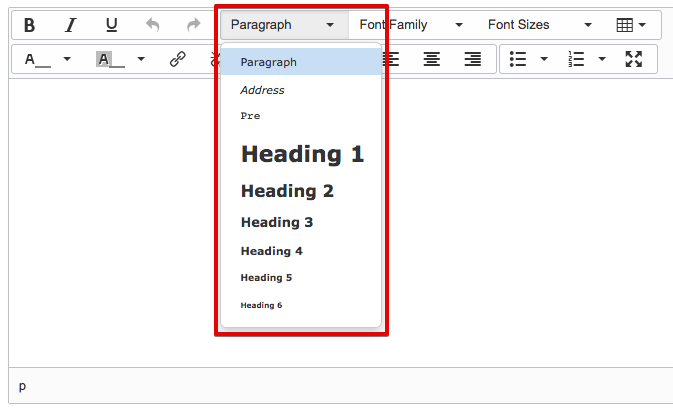
The property can be found under System Properties -> UI Properties.
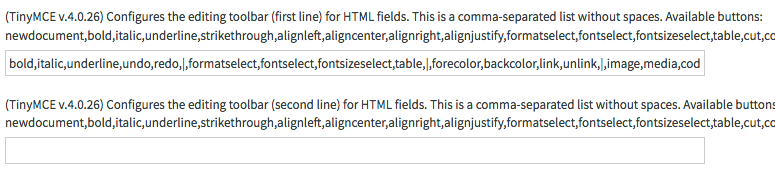
After you've got the property updated, a little bit of training to help the big contributors to start using it and your site should start to have a much more consistent look and feel.
Service Portal missing panel styles
December 13, 2016, 10:44 am - James Farrer
In ServiceNow and Service Portal there are some great features in a lot of places. There are, however, a number of rough edges since it's still pretty new. One of the places that I've found is a little rough is with the CSS. Many of the default widgets delivered by ServiceNow use the bootstrap panel structure. This gives a pretty nice format for setting up blocks with headings.
The problem is that most of the brand colors are not supported. It instead uses the default Bootstrap colors. The solution to this is to add the following styles to the widget CSS. It could also be added to the page CSS if you don't want to modify the widget.
This code utilizes the brand colors set in the Branding Editor to apply the colors.
/* add styles to support brand colors in basic panels */
.panel-danger > .panel-heading {
    color: $panel-bg;
    background-color: $brand-danger;
    border-color: $brand-danger;
}
.panel-warning > .panel-heading {
    color: $panel-bg;
    background-color: $brand-warning;
    border-color: $brand-warning;
}
.panel-success > .panel-heading {
    color: $panel-bg;
    background-color: $brand-success;
    border-color: $brand-success;
}
.panel-info > .panel-heading {
    color: $panel-bg;
    background-color: $brand-info;
    border-color: $brand-info;
}
"Your" vs. "My" and interacting with the user
November 16, 2016, 2:33 pm - James Farrer
If you're building a self-service website, when dealing with the stuff relating to the user, you should most definitely use "Your" not "My".
I've done a lot of work in the self-service side of ITSM over the years. Much of this has been with ServiceNow as the environment. I've also dabbled in various levels of web development and interface design. A very common mistake and point of argument is that the menu link should be "My [stuff]". I'm not sure where this got started but I'm guessing it has something to do with wanting to make people feel at home and in control of the situation when dealing with a website. Either that or someone was lazy and just not thinking things through.
When I am dealing with a website me, my stuff, my computer, etc. is on my side of the network connection. The company, website, forms, information, etc. is another entity that I am having a dialog with.
Flip that around and as a website developer I'm creating the dialog between the organization or company I represent and the end user. This means that when I'm giving instructions I will say "Here's what you need to do..." and anything that discusses the organizations thoughts, interests, etc. should take a first person narrative of "we", "us", "our", or in the case of a personal blog or something like that, "I", "me", and "my".
I ran into a page today where I realized there was a sentence explaining how something works with "you can go to...and this is where you'll find...". Right below that there was a block label "My Approvals" where the approvals of the end user, not the organization, can be found. It seems like a pretty minor thing and enough websites have flip-flopped with these that most people aren't going to think too much of it but somewhere in the back of their mind something is going to be saying "hey, something is not quite right here".
As an example of a site that has done this the right way, check out Amazon and their numerous links to "Your Account", "Your Orders", etc.
On a somewhat related note, I've also heard discussions on what form to put documentation for a system into. Should it be first person? Or perhaps an awkward neutral set of instructions that's cold and strictly business? This one often isn't quite as straight forward but I always appreciate the information that's written as more of an honest dialog that clearly articulates who is talking and who is listening. Making things a little more personal in a formal business world can often ease a little stress of a situation since it's just more natural.
So to sum it all up, here is my post that will hopefully persuade you to make your sites better at telling me when there is stuff relating to me with a link titled "Your stuff". Just to be as clear as mud.
Javascript in Helsinki - ECMA3 vs ECMA5
May 27, 2016, 1:51 pm - James Farrer
I was pleasantly surprised to hear that ECMA5 will now be supported in the Helsinki release of ServiceNow. For most people this won't mean much of anything. I was excited to hear about the change since there were a few things I had noticed missing when working with server side javascript. Most notably the indexOf operation on arrays.
Today I was testing out some functionality in Helsinki and ran into a really ugly error with something that worked perfectly fine in Geneva.
After a little digging I discovered that the format for JSON was updated as well and is more strict now. So if you're doing any parsing of JSON in ServiceNow, make sure your property names use double quotes instead of single quotes and you'll save yourself some trouble.
As an example, this:
{'incident':'caller_id'}
is incorrect. Instead you should use this:
{"incident":"caller_id"}
